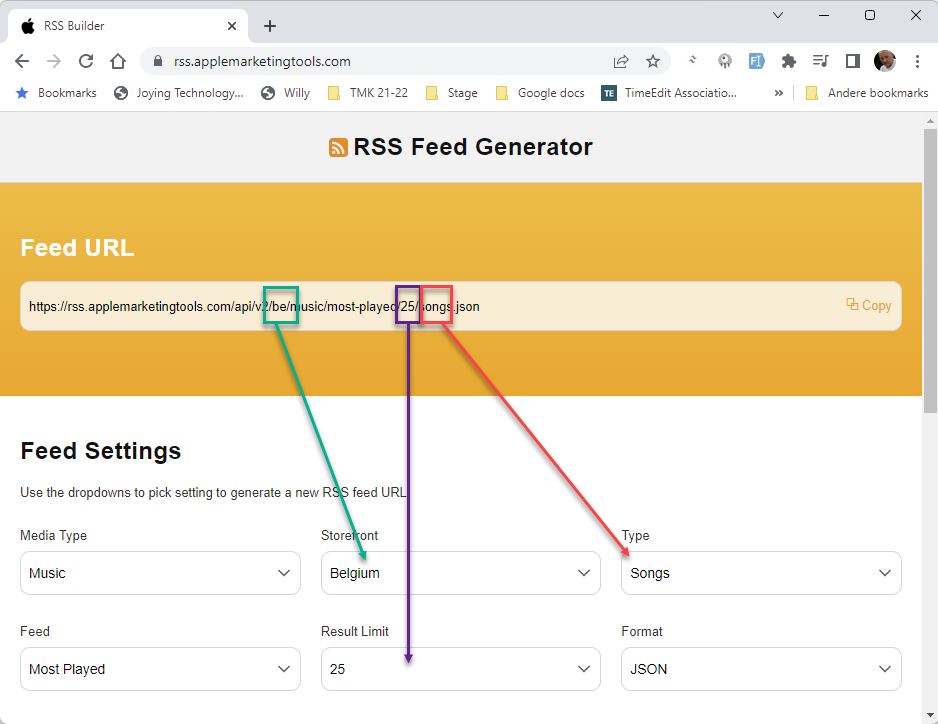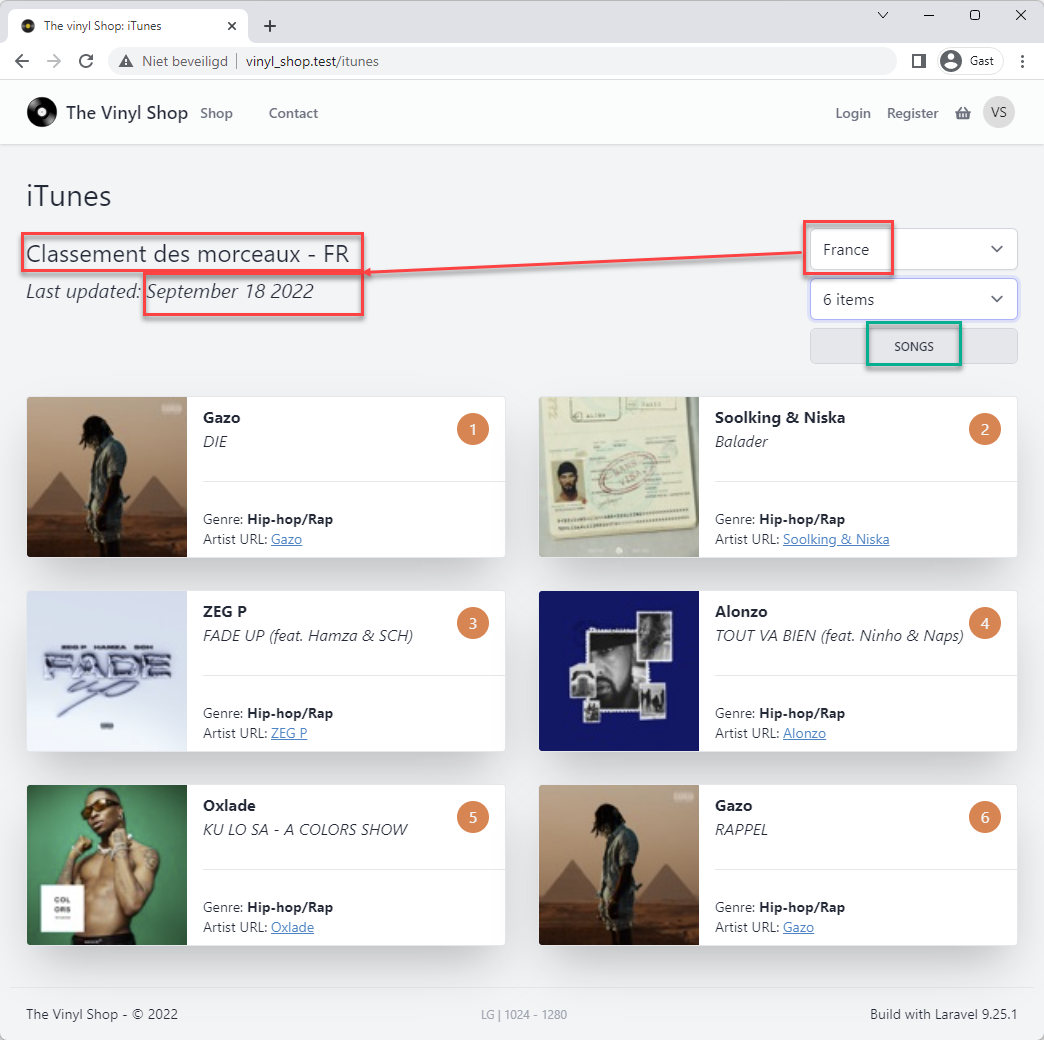
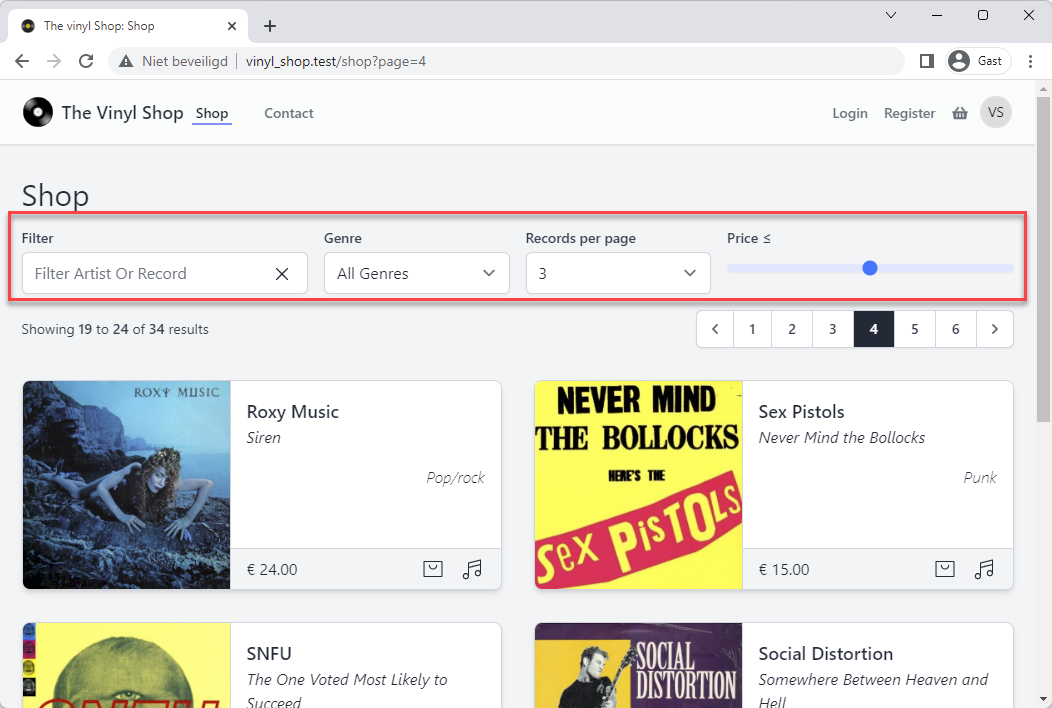
# Shop: filter section
# Add form elements to the view
- Add all form elements that we need for the filter to the view
livewire/shop.blade.php
result
- Most of the form elements are Jetstream components
(Tip:Ctrl + Clickon the component name to see how the component is implemented) - There is no
formtag, because we don't need to submit the form
(Any change in the form elements will trigger theupdatedmethod and the results will be updated automatically) - None of the input elements have a
valueattribute
(Thevalueattribute is not needed, because thewire:modelattribute is used)
{{-- filter section: artist or title, genre, max price and records per page --}} <div class="grid grid-cols-10 gap-4"> <div class="col-span-10 md:col-span-5 lg:col-span-3"> <x-jet-label for="name" value="Filter"/> <div class="relative"> <x-jet-input id="name" type="text" class="block mt-1 w-full" placeholder="Filter Artist Or Record"/> <div class="w-5 absolute right-4 top-3 cursor-pointer"> <x-phosphor-x-duotone/> </div> </div> </div> <div class="col-span-5 md:col-span-2 lg:col-span-2"> <x-jet-label for="genre" value="Genre"/> <x-tmk.form.select id="genre" class="block mt-1 w-full"> <option value="%">All Genres</option> </x-tmk.form.select> </div> <div class="col-span-5 md:col-span-3 lg:col-span-2"> <x-jet-label for="perPage" value="Records per page"/> <x-tmk.form.select id="perPage" class="block mt-1 w-full"> <option value="3">3</option> <option value="6">6</option> <option value="9">9</option> <option value="12">12</option> <option value="15">15</option> <option value="18">18</option> <option value="24">24</option> </x-tmk.form.select> </div> <div class="col-span-10 lg:col-span-3"> <x-jet-label for="price">Price ≤ <output id="pricefilter" name="pricefilter"></output> </x-jet-label> <x-jet-input type="range" id="price" name="price" min="0" max="100" oninput="pricefilter.value = price.value" class="block mt-4 w-full h-2 bg-indigo-100 accent-indigo-600 appearance-none"/> </div> </div>Copied!
1
2
3
4
5
6
7
8
9
10
11
12
13
14
15
16
17
18
19
20
21
22
23
24
25
26
27
28
29
30
31
32
33
34
35
36
37
38
39
40
41
42
43
44
45
46
2
3
4
5
6
7
8
9
10
11
12
13
14
15
16
17
18
19
20
21
22
23
24
25
26
27
28
29
30
31
32
33
34
35
36
37
38
39
40
41
42
43
44
45
46
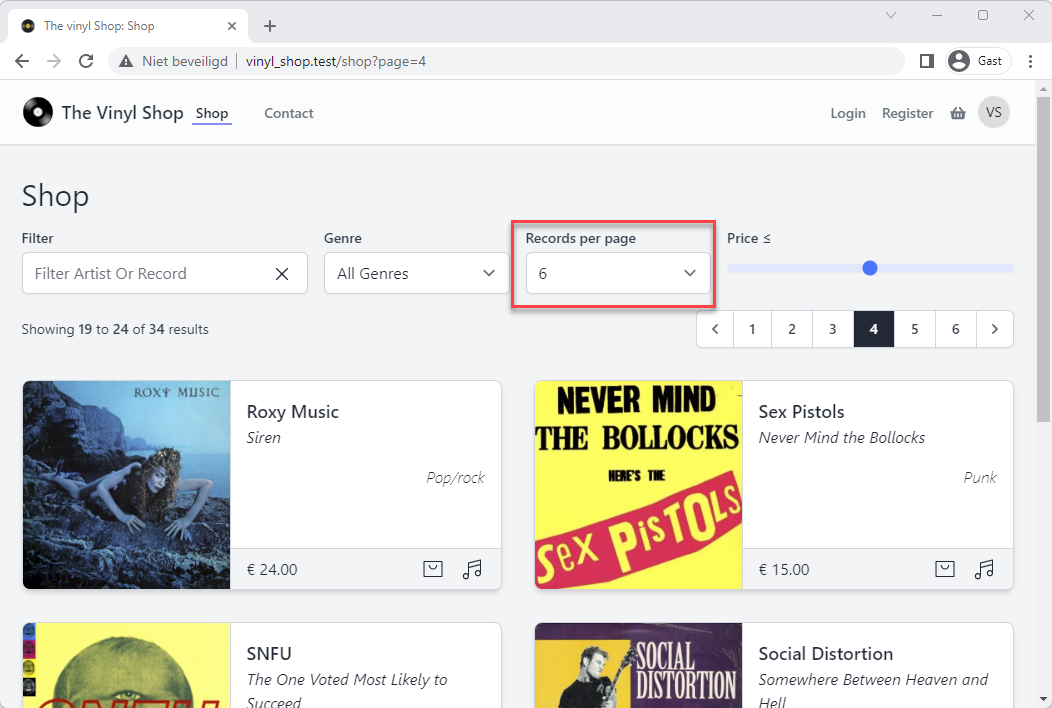
Dropdown records per page (optional)
- Because we are lazy developers we don't want to write all the options manually
- A more dynamic way for building the dropdown could be:
<x-tmk.form.select id="perPage" class="block mt-1 w-full"> @foreach([3,6,9,12,15,18,24] as $recordsPerPage) <option value="{{$recordsPerPage}}">{{$recordsPerPage}}</option> @endforeach </x-tmk.form.select>Copied!
1
2
3
4
5
6
2
3
4
5
6
# Bind properties to form elements
- Add 3 properties to the Shop component (one property for each form element)
- Bind the properties to the form elements with the
wire:modelattribute
Livewire/Shop.php
livewire/shop.blade.php
result
// public properties public perPage = 6; public $name; public $genre = '%'; public $price; public $loading = 'Please wait...'; public $selectedRecord; public $showModal = false;Copied!
1
2
3
4
5
6
7
8
9
2
3
4
5
6
7
8
9
# Fill the genre select element
- Get, inside the
render()method, all the genres that has records and add them to the select element
Livewire/Shop.php
livewire/shop.blade.php
result
- Line 15: select all the genres that has records (most of the genres don't have records) and count the number of records for each genre
- Line 16: order the records by
artistand then bytitle(we can use theorderBymethod multiple times) - Line 19: add
allGenresto thecompactarray
// public properties public $perPage = 6; public $name; public $genre; public $price; public $loading = 'Please wait...'; public $selectedRecord; public $showModal = false; public function showTracks(Record $record) { ... } public function render() { $allGenres = Genre::has('records')->withCount('records')->get(); $records = Record::orderBy('artist')->orderBy('title') ->paginate($this->perPage); return view('livewire.shop', compact('records', 'allGenres'))) ->layout('layouts.vinylshop', [ 'description' => 'Shop', 'title' => 'Shop' ]); }Copied!
1
2
3
4
5
6
7
8
9
10
11
12
13
14
15
16
17
18
19
20
21
22
23
24
25
2
3
4
5
6
7
8
9
10
11
12
13
14
15
16
17
18
19
20
21
22
23
24
25
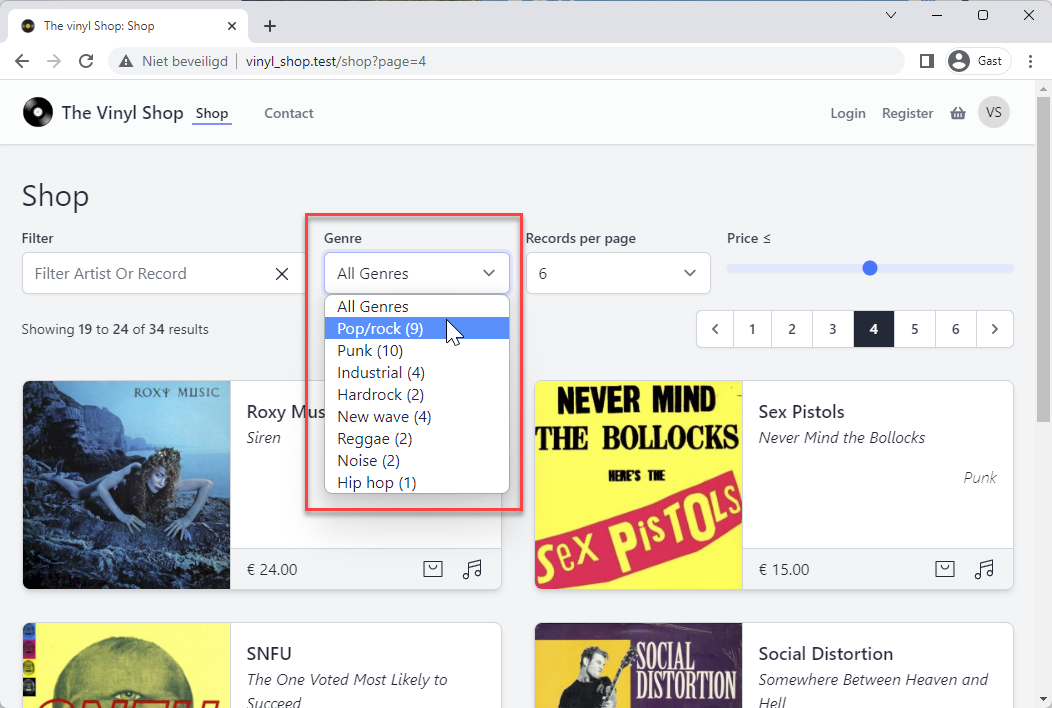
IMPORTANT
We can't use @foreach($allGenres as $genre) because $genre is already a property in the component.
That's the reason why we use @foreach($allGenres as $g) instead of @foreach($allGenres as $genre)
# Update the range input element with min and max values
TIP
- Remember that the
render()method is called every time a property is updated - Because the minimum and maximum price is not going to change, we can use the
render()method, but this will slow down the page load and that's not what we want - Livewire has a
mount()method that is called only once, when the component is loaded and just before the firstrender()method is called
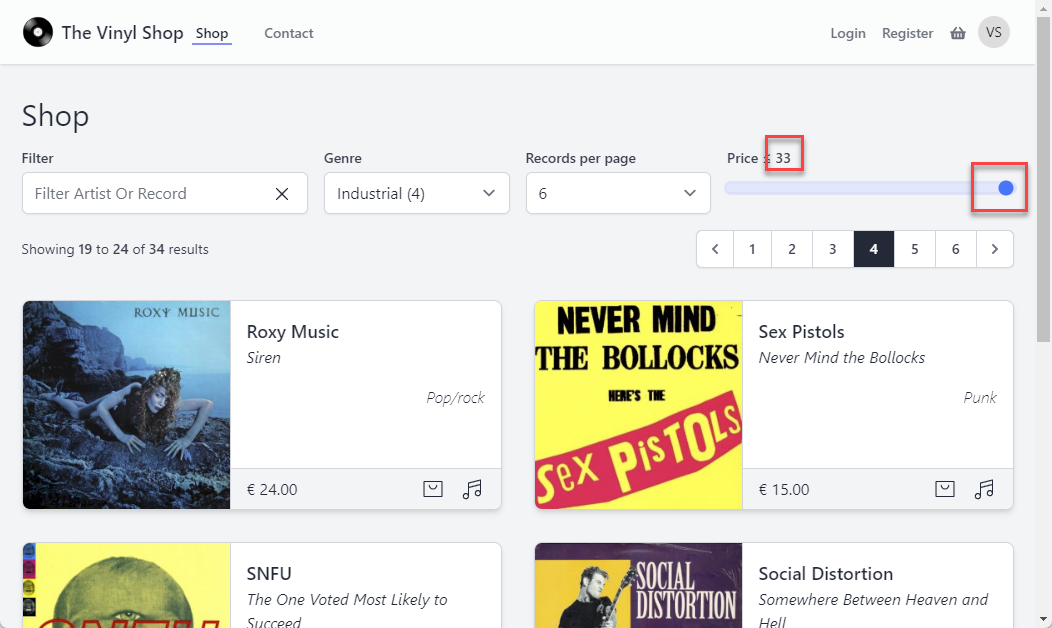
- Set the
minandmaxvalues of the range input element to the minimum and maximum price of the records - Therefor we need the extra properties
$priceMinand$priceMax- The
minandmaxvalues will also be calculated in themount()method because they are not going to change
- The
Livewire/Shop.php
livewire/shop.blade.php
result
- Line 6: add the properties
$priceMinand$priceMax - Line 16: use the min() (opens new window) method to calculate the minimum price in the records collection and round it down to the nearest integer
- Line 17: use the max() (opens new window) method to calculate the maximum price in the records collection and round it down to the nearest integer
- Line 18: set the default selected
$priceproperty to the$priceMaxproperty
// public properties public perPage = 6; public $name; public $genre = '%'; public $price; public $priceMin, $priceMax; public $loading = 'Please wait...'; public $selectedRecord; public $showModal = false; public function showTracks(Record $record){ ... } public function mount() { $this->priceMin = ceil(Record::min('price')); $this->priceMax = ceil(Record::max('price')); $this->price = $this->priceMax; } public function render() { ... }Copied!
1
2
3
4
5
6
7
8
9
10
11
12
13
14
15
16
17
18
19
20
21
2
3
4
5
6
7
8
9
10
11
12
13
14
15
16
17
18
19
20
21
# Basic filter
- Now that all elements are set up, we can start filtering the records
- The filter will be based on the
$name,$genreand$priceproperties and will be applied in therender()method
livewire/Shop.php
result
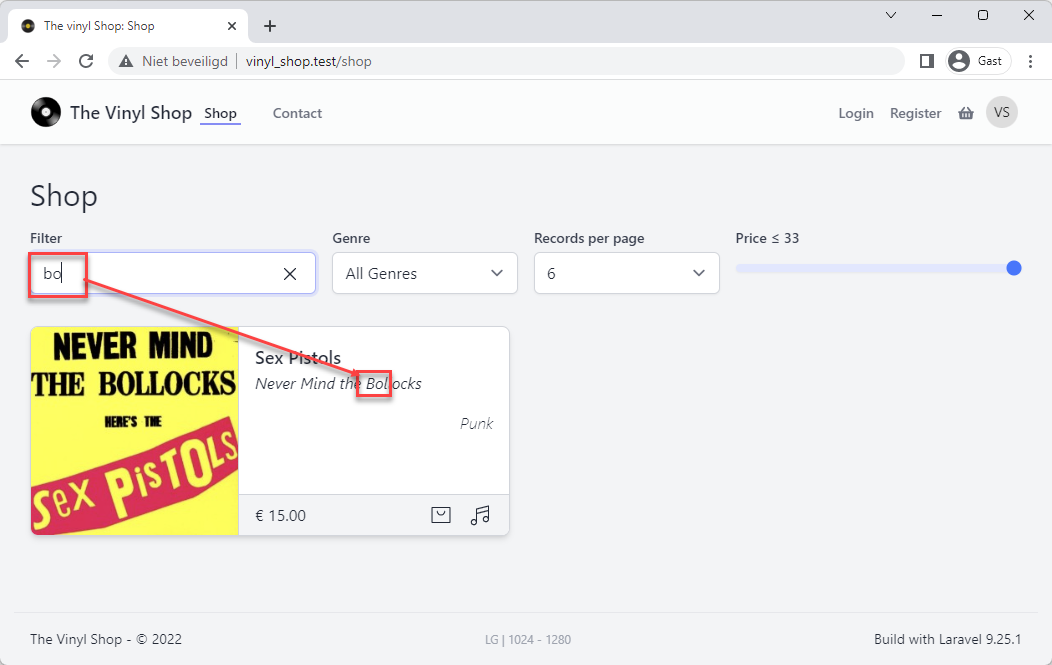
- Add the where() (opens new window) clauses to the
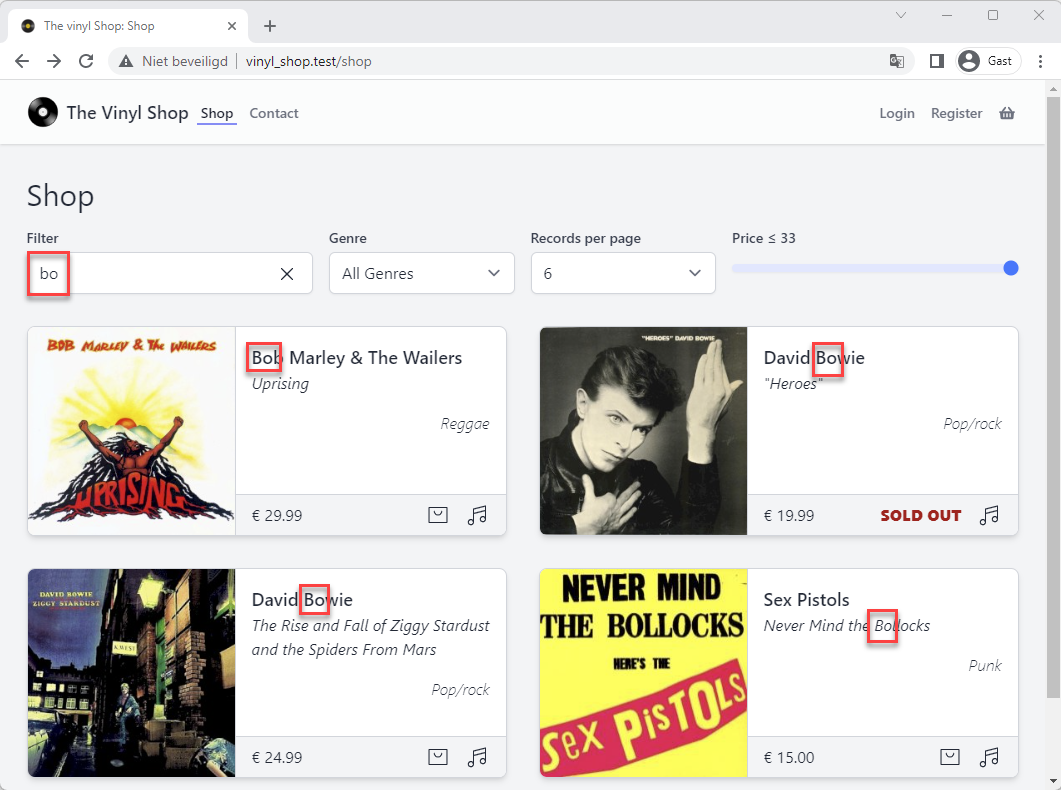
$recordsquery- Line 6: if you search for record title that contains the letters bo, you have to append and prepend a
%to find these letters at any position:where([['title', 'like', '%bo%'], [...], [...]]) - Line 7: the values of
$genreare numbers, except the first one. 'All genres' is not a number but corresponds to the value%.
Because of the different types, you have to use'like'to compare and not'='e.g.- for 'pop/rock' you get
where([[...], ['genre_id', 'like', 1], [...]]) - and for 'All genres' you get
where([[...], ['genre_id', 'like', '%'], [...]])
- for 'pop/rock' you get
- Line 8: the price of the record must be less or equal to the
$priceproperty
- Line 6: if you search for record title that contains the letters bo, you have to append and prepend a
public function render() { $allGenres = Genre::has('records')->withCount('records')->get(); $records = Record::orderBy('artist')->orderBy('title') ->where([ ['title', 'like', "%{$this->name}%"], ['genre_id', 'like', $this->genre], ['price', '<=', $this->price] ]) ->paginate($this->perPage); return view('livewire.shop', compact('records', 'allGenres')) ->layout('layouts.vinylshop', [ 'description' => 'Shop', 'title' => 'Shop' ]); }Copied!
1
2
3
4
5
6
7
8
9
10
11
12
13
14
15
16
17
2
3
4
5
6
7
8
9
10
11
12
13
14
15
16
17
WARNING
- Reload the browser and click on page 6 of the navigation
- Search for
boand you will see that view is not properly updated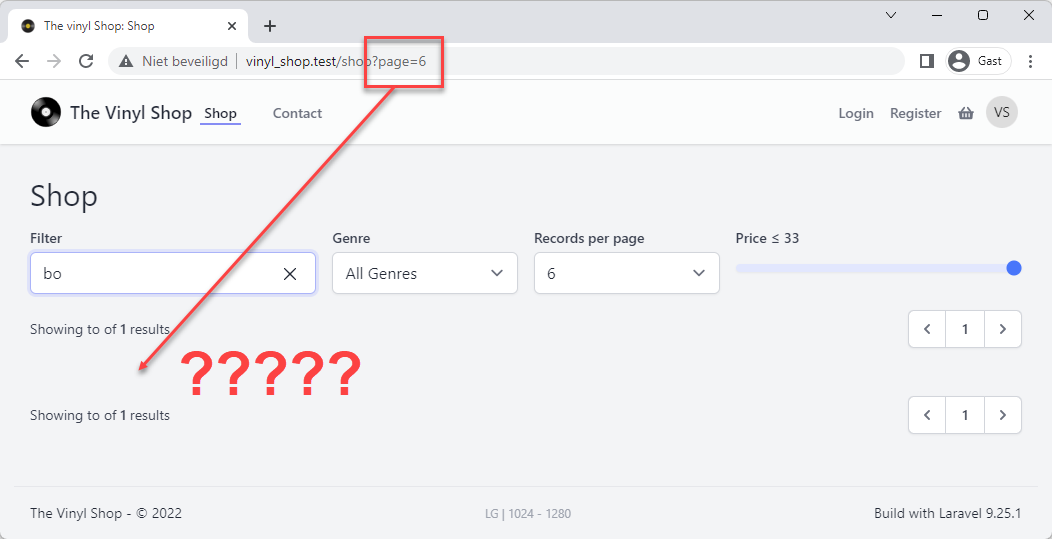
- You're still on page 6, but the one record that was found is on page 1!
- The
paginate()method is not (yet) aware of this - When you use the
paginate()in combination with a filter, you always have to reset the page in theupdated()method - Add the
updated()method to the component and test the filter again:
public function updated($propertyName, $propertyValue) { // dump($propertyName, $propertyValue); $this->resetPage(); } public function showTracks(Record $record){ ... } public function mount() { ... } public function render() { ... }Copied!
1
2
3
4
5
6
7
8
9
10
11
2
3
4
5
6
7
8
9
10
11
REMARKS
- The
updated($propertyName, $propertyValue)(opens new window) method is called every time a property is updated - The (optional)
$propertyNameand$propertyValueparameters contains the name and the new value of the property that was updated - For now we don't need the
$propertyNameand$propertyValueparameters yet, but it is good practice to add them anyway - You can also use individual
updated()methods for each property, e.g.updatedName($value),updatedGenre($value),updatedPrice($value),updatedPerPage($value),updatedAllGenres($value), ...
# Advanced filter
# orWhere() clause
- How can we use the
$nameproperty to search for a record title OR artist?- Add an extra orWhere() (opens new window) clause to the
Recordquery
- Add an extra orWhere() (opens new window) clause to the
livewire/Shop.php
result
- The only difference with the
where()clause and theorWhere()clause:- Line 6:
['title', 'like', ...] - Line 11: becomes
['artist', 'like', ...]
- Line 6:
public function render() { $allGenres = Genre::has('records')->withCount('records')->get(); $records = Record::orderBy('artist')->orderBy('title') ->where([ ['title', 'like', "%{$this->name}%"], ['genre_id', 'like', $this->genre], ['price', '<=', $this->price] ]) ->orWhere([ ['artist', 'like', "%{$this->name}%"], ['genre_id', 'like', $this->genre], ['price', '<=', $this->price] ]) ->paginate($this->perPage); return view('livewire.shop', compact('records', 'allGenres')) ->layout('layouts.vinylshop', [ 'description' => 'Shop', 'title' => 'Shop' ]); }Copied!
1
2
3
4
5
6
7
8
9
10
11
12
13
14
15
16
17
18
19
20
21
22
2
3
4
5
6
7
8
9
10
11
12
13
14
15
16
17
18
19
20
21
22
# Create a query scope for the orWhere() clause
- There is only one line of code that is different between the
where()andorWhere()clauses - The more lines of code you have to repeat, the more difficult it is to maintain your code
- So this is a good moment to create a query scope for the search in
titleorartistattributes - Open the app/Models/Record.php model and add an extra scope method
app/Models/Record.php
livewire/Shop.php
result
- The scope method is called
scopeSearchTitleOrArtist()and takes two parameters:$queryand$search - The method returns the query with the
orWhere()clause
... public function scopeMaxPrice($query, $price) { ...} public function scopeSearchTitleOrArtist($query, $search = '%') { return $query->where('title', 'like', "%{$search}%") ->orWhere('artist', 'like', "%{$search}%"); } ...Copied!
1
2
3
4
5
6
7
8
9
10
11
2
3
4
5
6
7
8
9
10
11
Type hinting
- Got to the menu Laravel > Generate Helper Code to regenerate the updated type hinting for the
Recordmodel - Select
searchTitleOrArtist()(NOTscopeSearchTitleOrArtist()) from the list

# Give feedback if the result is empty
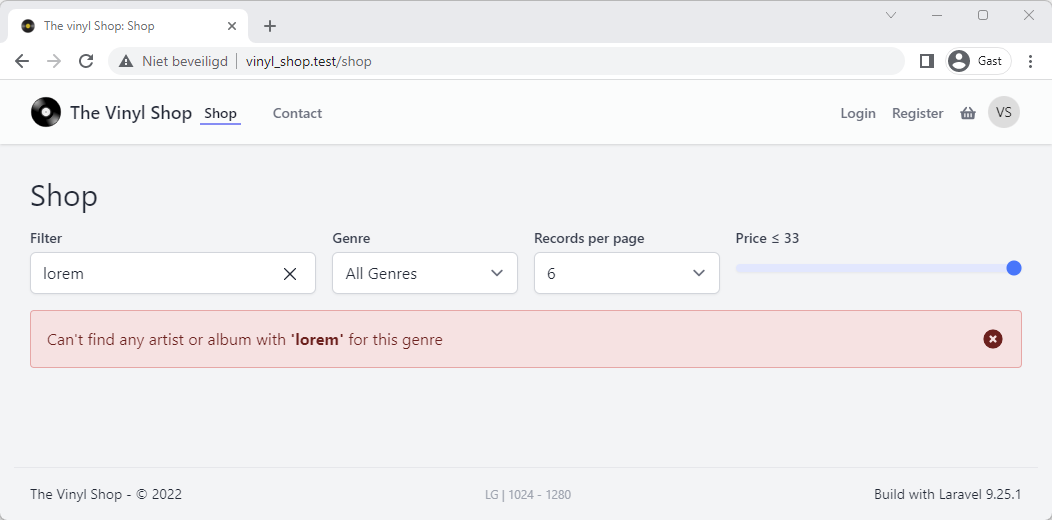
- It's a good practice to give some feedback to the user if the result is empty
- We'll do this by adding an alert box below the form
- Use the Blade
@ifdirective in combination with theisEmpty()(opens new window) method to show the alert only if the result is empty
livewire/shop.blade.php
result
{{-- master section: cards with paginationlinks --}} <div class="my-4">{{ $records->links() }}</div> <div class="grid grid-cols-1 lg:grid-cols-2 2xl:grid-cols-3 gap-8 mt-8" ... > <div class="my-4">{{ $records->links() }}</div> {{-- No records found --}} @if($records->isEmpty()) <x-tmk.alert type="danger" class="w-full"> Can't find any artist or album with <b>'{{ $name }}'</b> for this genre </x-tmk.alert> @endifCopied!
1
2
3
4
5
6
7
8
9
10
11
2
3
4
5
6
7
8
9
10
11
# Update the pagination behavior
- There is one little problem with the pagination
- Reset the filter and go to the last page
- Open on the details of a record
- Close the modal
- After that, we're redirected back to the first page, because with every change in one of the properties, the
updated()method is called:public function updated() { $this->resetPage(); } - We only want to reset the page when the filter has been changed, not when anything else is changed
- So we need to use a more specific paginator behavior inside the
updated()method- The paginator will only reset the page when the
$perPage,$name,$genreor$priceproperty has changed
- The paginator will only reset the page when the
- Update the
updated()method to:
public function updated($propertyName, $propertyValue) { // dump($propertyName, $propertyValue); if (in_array($propertyName, ['perPage', 'name', 'genre', 'price'])) $this->resetPage(); }Copied!
1
2
3
4
5
6
2
3
4
5
6
# Better UX
- With a few minor changes, you can increase the user experience (UX) significantly
# Debounce the input fields
- Every keystroke in a filter field and moving the price slider, triggers a new search and a roundtrip to the server
- This behavior is very annoying (and slow)
- This can be solved by debouncing (opens new window) the input fields:
- Line 3: replace
wire:model="name"withwire:model.debounce.500ms="name" - Line 8: replace
wire:model="price"withwire:model.debounce.500ms="price"
- Line 3: replace
... <x-jet-input id="name" type="text" wire:model.debounce.500ms="name" class="block mt-1 w-full" placeholder="Filter Artist Or Record"/> ... <x-jet-input type="range" id="price" name="price wire:model.debounce.500ms="price" min="{{ $priceMin }}" max="{{ $priceMax }}" oninput="pricefilter.value = price.value" class="block mt-4 w-full h-2 bg-indigo-100 accent-indigo-600 appearance-none"/> ...Copied!
1
2
3
4
5
6
7
8
9
10
11
12
13
2
3
4
5
6
7
8
9
10
11
12
13
# Clear the filter field
- We already placed a little X over the input field to clear the filter but it's not working yet
- Make an Alpine component:
- Line 2: initialize an Alpine component with the
x-dataattribute
Bind (entangle) the Alpinenameproperty to the$nameproperty of the Livewire component - LIne 5 - 6: replace the server side Livewire bounding (
wire:model) with the client side Alpine bounding (x-model) - Line 10: the div with the X is only visible when the
$nameproperty is not empty - Line 11: add a
@clickevent to the X to empty the value of the input field with thename = ''statement
- Line 2: initialize an Alpine component with the
<div x-data="{ name: @entangle('name') }" class="relative"> <x-jet-input id="name" type="text" x-model.debounce.500ms="name" {{--wire:model.debounce.500ms="name"--}} class="block mt-1 w-full" placeholder="Filter Artist Or Record"/> <div x-show="name" @click="name = '';" class="w-5 absolute right-4 top-3 cursor-pointer"> <x-phosphor-x-duotone/> </div> </div>Copied!
1
2
3
4
5
6
7
8
9
10
11
12
13
14
15
2
3
4
5
6
7
8
9
10
11
12
13
14
15

# EXERCISES
# 1: Alternative feedback message
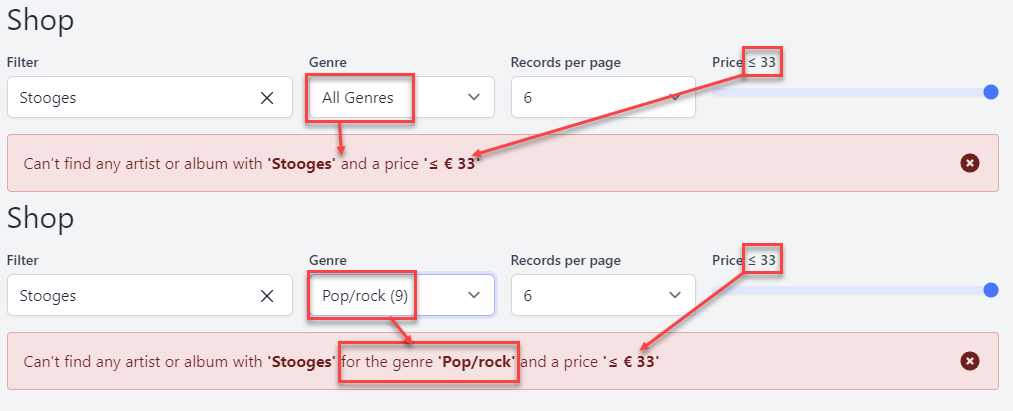
- Show the selected genre and the price within the feedback message
# 2: iTunes top songs Belgium
# Basic version
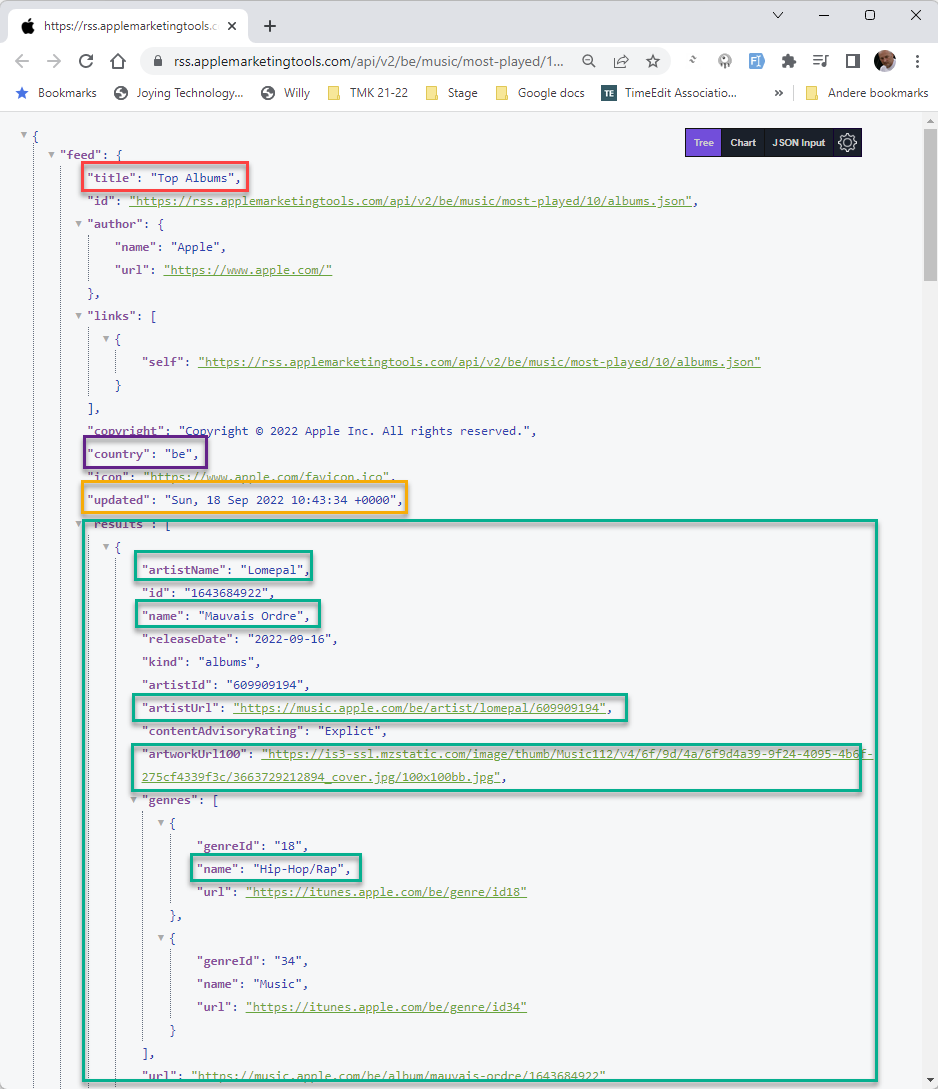
- Use the native Laravel HTTP-method to show the top 10 of Belgian iTunes albums for today
- Create a Livewire component (
Itunes) for this route: http://vinyl_shop.test/itunes (opens new window) - Get the top 10 Belgian albums from the iTunes API:
- Feed generator: https://rss.applemarketingtools.com/ (opens new window)
- JSON response for 10 songs: https://rss.applemarketingtools.com/api/v2/be/music/most-played/10/albums.json (opens new window)
TIP
This is a live feed and the content changes daily. Compare your result with the live preview (@it-fact.be)
JSON data
result
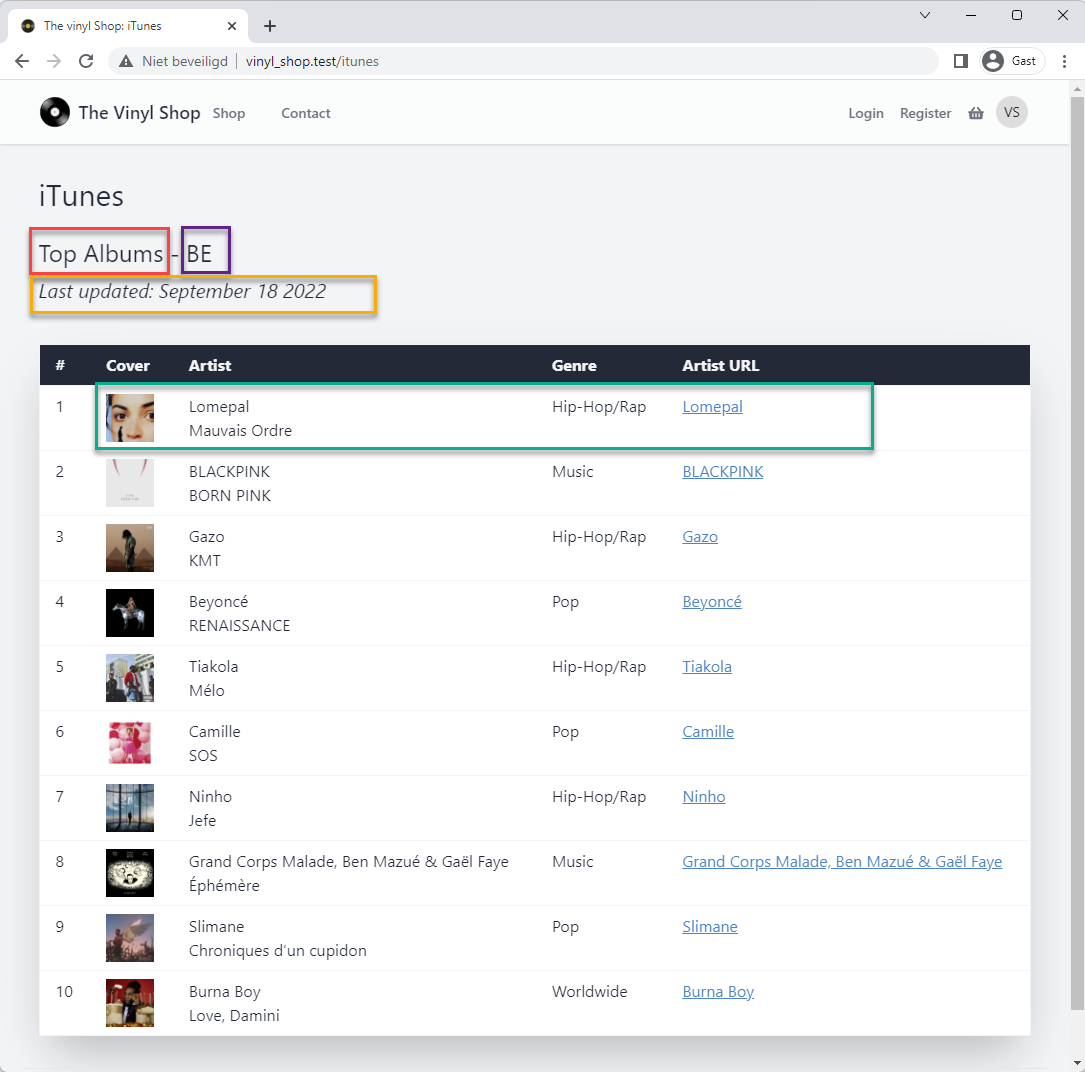
# Advanced version
JSON data
result
- https://rss.applemarketingtools.com/ (opens new window)
- Add some filters for:
- Storefront: (= country code)
be,nl,lu, ... in an<x-tmk.form.select>component - Result Limit:
6,10,12, ... in an<x-tmk.form.select>component - Type:
albumsorsongsin an<x-tmk.form.switch>component
- Storefront: (= country code)
- Don't forget the preloader